








TIME BILLING SOFTWARE

See what every hour earns

Get one time and billing software to set billable rates, track budget, and secure margin based on time your team already tracks.

Billing top image

Crafted locally, trusted globally

Make time spent the time billed

Your team tracks time; TimeCamp helps you see profit, simple as that. Assign a rate to every team member, a budget to every project, and a margin to every client, all based on work hours that are already on your timesheet. No Excel spreadsheets, all automated to ease the administrative burden.

See the profit, not the loss

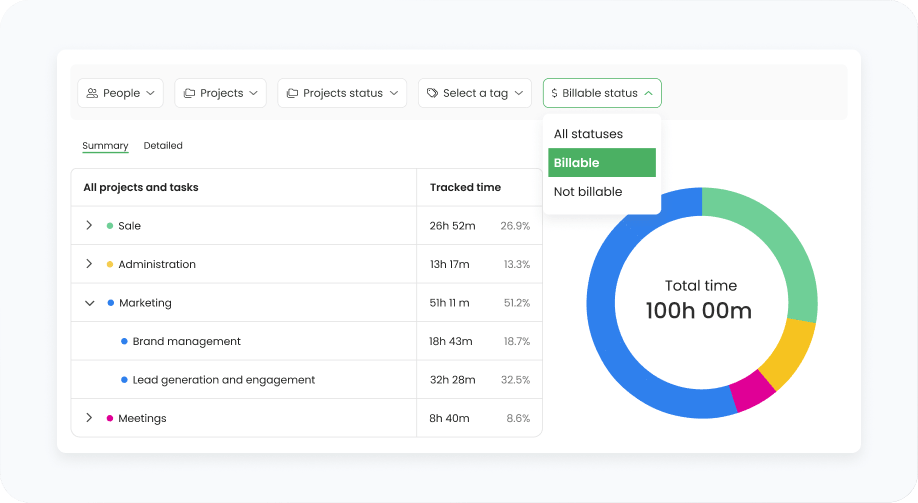
Say goodbye to missed revenue just because someone forgot to start a timer, set their time billable, or submit timesheets on time. Automatic time tracking helps you see how much you earned, not just what you lost.

features
features

Match the rates with your billing needs

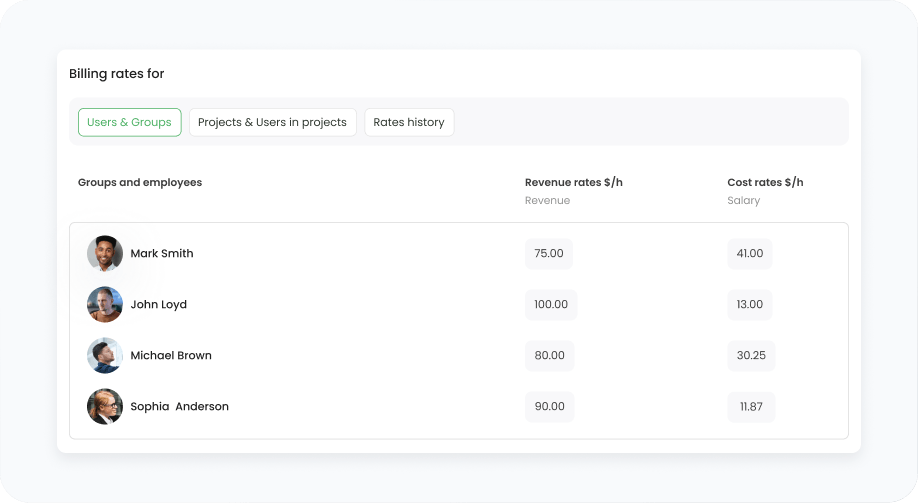
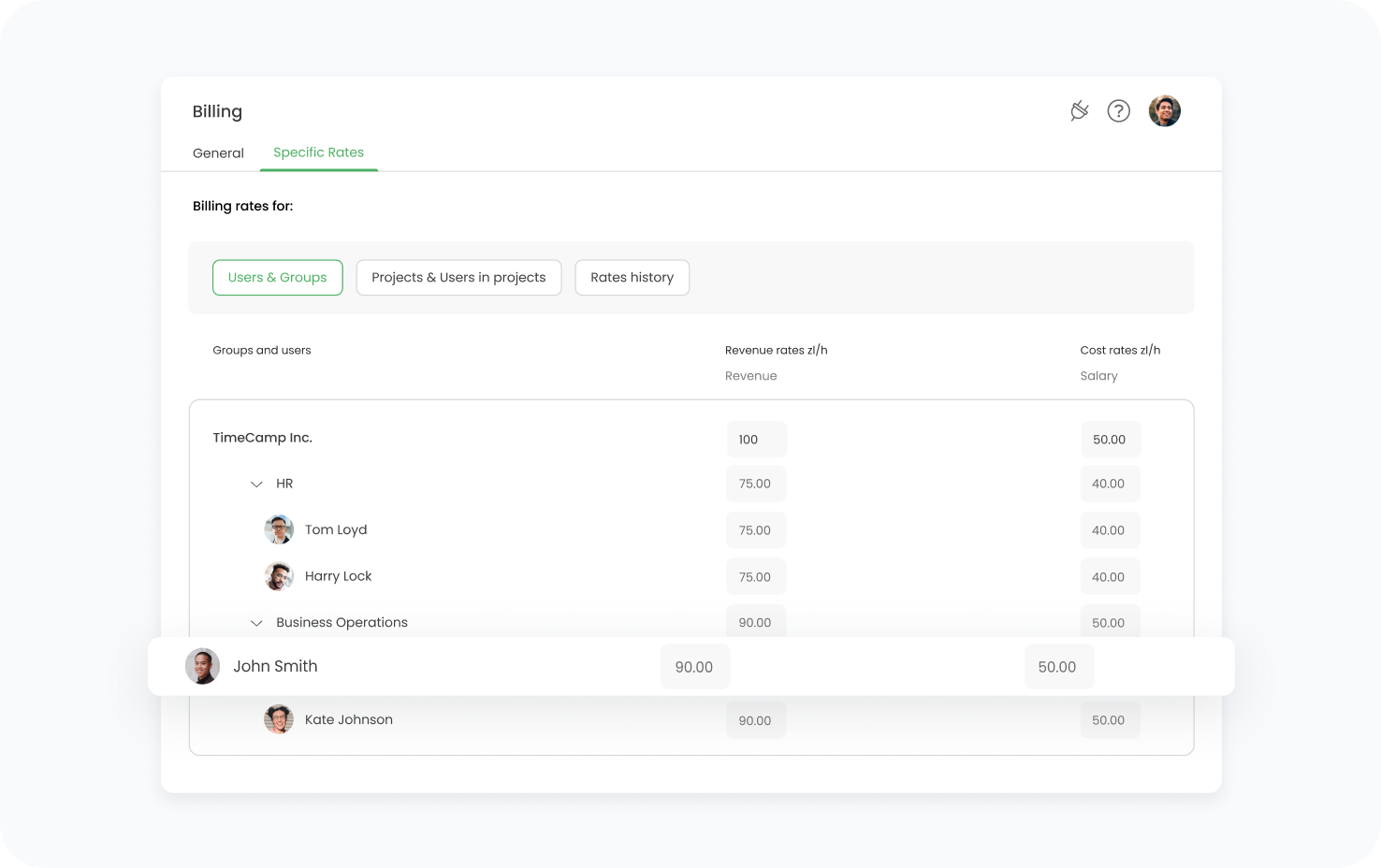
One flat project rate bills different team members the same, and leaves no space for exceptions. TimeCamp helps you adjust the hourly rates to people or projects, so the most specific rate always wins.

Spot the budget risk in time

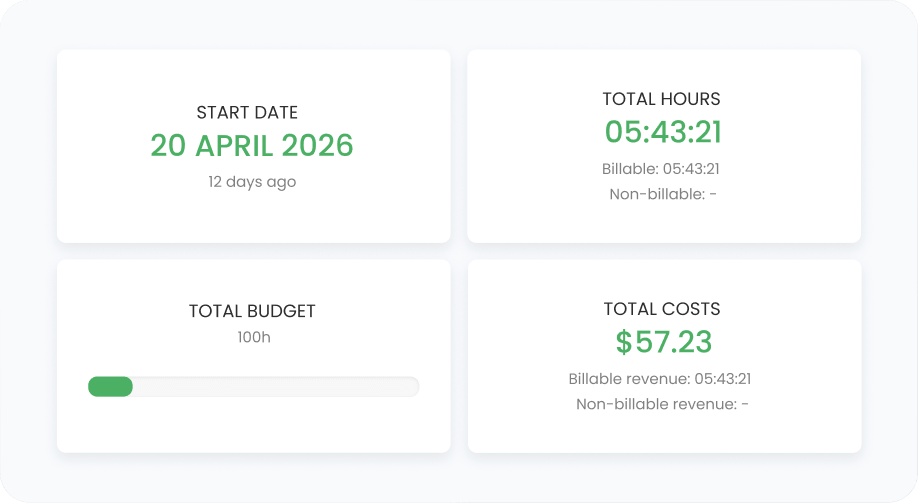
Wth multiple projects running, the loss often surfaces when it's too late to fix it. Extended reporting features in TimeCamp prevent overruns or help you spot them in time, before they affect project profitability.

features
features

Know which client actually pays off

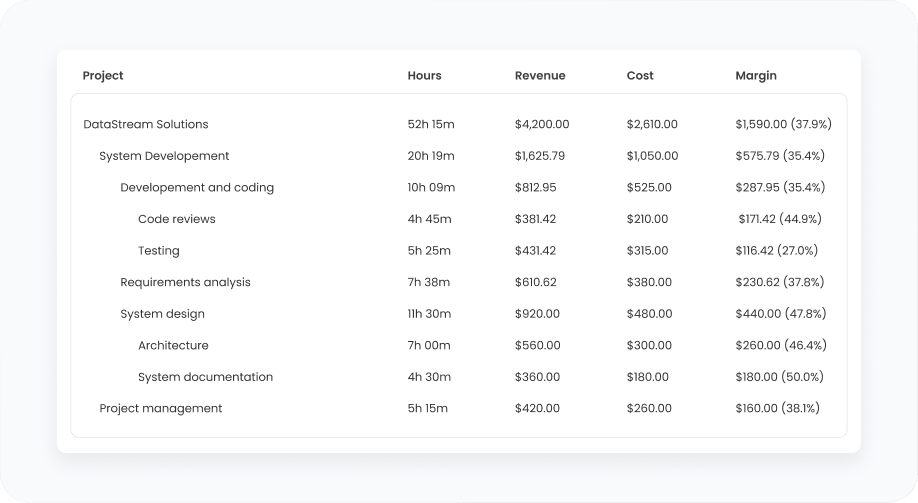
Spreadsheets won't tell you that your busiest client isn't the most profitable one. TimeCamp's detailed reporting, based on tracked hours and rates, puts costs against billed amounts, revealing what each project actually earns.

One time billing software, multiple ways to boost project profitability

Take a quick call with us to see TimeCamp with your own projects and rates, or start for free for 14 days, no credit card required.

14-day free trial No credit card
badge
badge
badge

Bill clients as your business needs

Designed for all teams, whether they bill by hours or at a fixed price. TimeCamp adjusts to the contract's arrangement, while the underlying time tracking stays the same, keeping invoiced work hours accurate and telling you whether a flat-fee project actually justifies its cost.

Hourly

Five rate levels, so different roles are billed separately, not at a team average

Fixed-fee

Compare labor costs with the fee, so the flat price still shows its margin

Capped

Bill by the hour to an agreed limit and get a notification before reaching the cap

Mixed

Run all three models across one account and stay specific to your client's needs

TimeCamp has solved our company's hourly billing problem. Using this program has made it much easier to track employee hours and to account for them when paying invoices.

Filip Gonczewski M4Wind, 50+

Thanks to the ease of charging the hourly costs of our collaborators, we can obtain very precise information about the value of each project on which the teams work.

Noe Martinez Mid-market team

FAQ

Time and billing software links the hours your team, external contractors, and freelancers record with the billable rates and budgets. This way, the work you track and the money you bill stay in one place. It’s way more advanced than software that just issues client invoices, because you can see what each project earns while you can still make adjustments, not just send an invoice document when the work is done.

Every time entry in TimeCamp is marked billable or non-billable (you can do it manually for each time entry or set tracked time for each project or task to be billable by default). With timesheet approvals, managers can review submitted time and ensure what is charged for work matches what reaches the invoice (or correct it when the numbers don’t align). Timesheet approvals are available on the Ultimate plan (see full pricing).

Rates in TimeCamp work on five different levels, starting from an account default, then going down to a single person and a single project. The most specific rate always wins. In practice, it means different seniority levels are billed at their own rate instead of the same rate within one project. The rate hierarchy is available on the Ultimate plan.

Thanks to the billable rates history, past time entries keep the rate assigned when logged. This way, a rate change applies going forward instead of changing what was already billed, so even when you change a rate mid-contract, it doesn’t mean recalculating previous reports to new numbers.

When you set a budget in hours or in money for a project, TimeCamp sends you an email notification when the tracked time approaches the threshold you applied. This way, managers can review the scope, adjust staffing, or update project details with clients while they can still change the outcome. Budgets and budgeting alerts are available on the Premium plan and above.

Each rate carries both revenue and cost values, so the project report shows what the work will bill against its delivery cost, showing a margin between them – per project and per client. Reading the full picture helps managers assess project revenue before issuing the invoice. Labor cost, cost rates, and financial reports (such as the margin report) are part of the Ultimate plan.

You can issue an invoice based on the approved time, rates, and expenses set for particular projects and tasks, instead of creating a blank document, which saves time on invoice creation. Read more about the full invoicing workflow, from creating a new document to exporting it to QuickBooks or Xero, on our invoicing page.

timecamp img

Get your business a billable hours catcher

Switch to automated time tracking software and improve billing accuracy by 20%. Let TimeCamp show you what your projects have been earning or costing you, once every hour gets into time logs.

14-day free trial No credit card
badge
badge
badge
badge
badge
badge
badge
badge
badge
badge